AstraA Jellyfin client for Fire TV’s Vega OS

A native Jellyfin client for the Fire TV Amazon didn't let you have. Point it at your own server. Watch your own library. That's it.

Free — always Your server — no Astra account Vega Fire TV — built for new devices
See it in action

Built around a remote, not a mouse

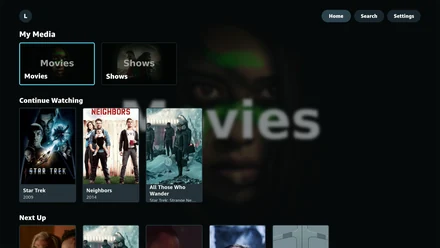
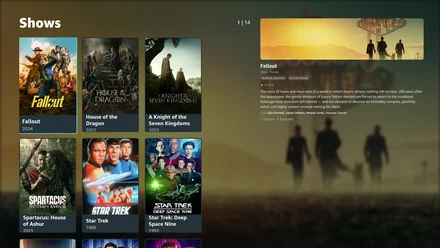
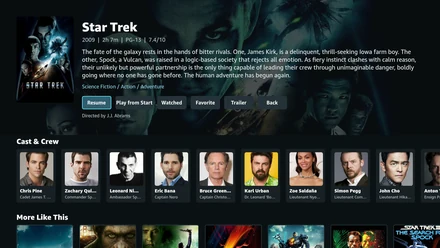
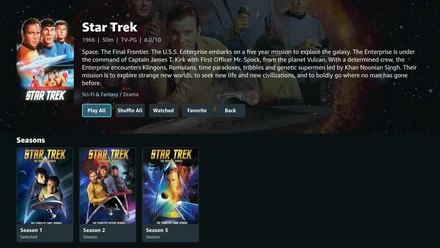
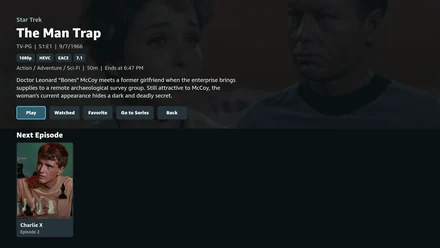
Astra home screen with Jellyfin library rows Astra TV shows library grid Astra movie detail page with cast Astra series detail page with seasons Astra episode detail page with next up
Why this exists

The catalyst wasn't the whole reason

The first spark was simple: someone I cared about bought one of the new Vega OS Fire TV Sticks and suddenly had no practical way to use Jellyfin on it.

That personal problem pointed at a bigger one. A new generation of Fire TV hardware had arrived without the older paths Jellyfin users relied on, so Astra exists to make self-hosted libraries usable there again.

It is built for the living room version of that problem: install it, point it at your Jellyfin server, and hand the remote to someone who just wants to watch.

"Astra is for people who already own their media and want it to work on the newer Fire TV hardware."

Built for the Vega OS devices that could not use the older Jellyfin paths.
How it works

Set up once. Then anyone can use it.

01

Install Astra

From the Amazon Appstore, on supported Fire TV devices running Vega OS.

02

Point it at your server

Astra finds Jellyfin on your local network, or you can type in an address if it's remote. Log in with your Jellyfin account; Astra does not require its own account or hosted service.

03

Hand over the remote

From here it's just scroll, pick something, watch. If someone technical handles step two, everyone else just uses it.

Full setup guide, what every setting does, and troubleshooting →

Licensing

Open, on a timeline

Astra's source is public to read on GitHub, but under a source-available license right now, not fully open source yet. Vega support took real work against a new platform, so the license protects that head start while still letting people read, study, and contribute back.

—
DAYS UNTIL AUTOMATIC APACHE 2.0 CONVERSION
$1,000
OR SOONER, IF COMMUNITY SUPPORT GETS THERE FIRST

Whichever comes first — July 4, 2028 or the funding goal — the entire codebase converts automatically, no restrictions, usable by anyone including commercially.

Help move the date up
Release history

Continuously improving Astra

Every update is shaped by real Jellyfin libraries, physical Fire TV testing, and reports from the people using Astra.

Astra 1.4.0

Long movies play start to finish, and subtitles stop punishing your server

  • Fixed a feature-length movie being shut down partway through. The Fire TV was reclaiming Astra’s video roughly an hour in — one film died at 61 minutes. Astra now tells the system a viewer is watching for as long as a video is open, and a 130-minute movie has since played start to finish without a single interruption.
  • Fixed turning on subtitles forcing your server to re-encode the entire movie. Astra draws text subtitles itself again, so a file that needed no conversion stays that way. On a server without a graphics card this was the difference between smooth playback and constant buffering.
  • Fixed subtitles stored inside MP4 files always being burned into the picture. They are ordinary text and are now drawn in the app.
  • Made switching subtitle tracks, or turning them off, instant instead of reloading the video.
  • Fixed some MKV and AVI files refusing to start when the server handed back a stream in a form Astra could not play.
  • Added per-server learning: Astra asks two questions the first time it meets a server — whether it has a graphics card, and whether the room has surround sound, with “I don’t know” as a real answer — then corrects those answers on its own as you watch. Settings can see and override any of it.
  • Added a “What’s new” list after an update, shown once and dismissed with one press.
  • Added Instant or Reloads marks on every subtitle track, so you can see which ones switch on for free before you pick one.

Requires Vega OS 1.2. Pausing a movie is now safe for as long as you like, and the hold is released once a video finishes so a paused end screen will not keep the device awake.

Astra 1.3.0

HDR that stays HDR, and playback that recovers itself

  • Fixed HDR movies arriving as washed-out SDR: an HDR title now keeps its HDR picture instead of being re-encoded down on the way to the TV.
  • Fixed video that used to stall or quit partway through, which now recovers on its own instead of dropping you back to the menu.
  • Fixed resuming a title starting slightly off from where you actually stopped.
  • Made libraries open immediately: a 90-movie shelf that took nearly three seconds now appears in a fraction of one.
  • Made backing out of a movie return you to the card you left, in the same place on the shelf.
  • Changed the diagnostics view to report dropped frames as a percentage, because the raw counts the device reports are not trustworthy.

Requires Vega OS 1.2. 7.1 audio requires direct play; transcoded audio is 5.1 maximum.

Astra 1.2.1

Skip Credits, Next Episode, and a subtitle preference that sticks

  • Added Skip Credits, using the credits your Jellyfin server already knows about rather than a guessed offset. Ask, auto-skip, or ignore, in Settings > Playback.
  • Added Next Episode, with an optional autoplay countdown. Autoplay stops to ask after three episodes in a row, so a series does not run all night on its own.
  • Added a subtitle preference that applies everywhere: default per video, all on, all off, or only forced. Picking a track inside the player still affects only that video.
  • Fixed playback sticking on “Buffering” forever when a movie with burned-in subtitles was resumed, jumped a long distance, or had its tracks switched partway through.

Skip Credits and Next Episode began as a code contribution from @brontodev.

Astra 1.2.0

Playback repaired for Vega OS 1.2

  • Fixed resuming a title, switching audio tracks, and turning on burned-in subtitles, which could each close the app after the Vega OS 1.2 update.
  • Made startup and seeking far quicker: a long jump that took most of a minute now takes seconds, and short skips are close to instant.
  • Updated for Vega OS 1.2 and the current Amazon device libraries.
  • Added an optional diagnostics view showing playback timings.

Requires Vega OS 1.2. Devices on an earlier Vega OS remain on 1.1.2. Still being worked on: long chapter jumps, and subtitle timing after one.

Astra 1.1.2

Playback reliability for Vega Fire TV

  • Fixed intermittent stutter on affected MP4 and MOV video.
  • Fixed saved-position resume skipping through earlier scenes.
  • Improved audio/video sync during long viewing sessions.
  • Expanded buffering, delivery, build, and playback-health diagnostics.
Astra 1.1.1

Playback stability hardening

Hardened keyboard teardown, media-buffer operations, seeks, cleanup, and screen lifecycle handling.

Astra 1.1.0

Music and living-room polish

Added Jellyfin music libraries, background playback, remote controls, automatic track advancement, burn-in protection, unwatched badges, and larger library cards.

Astra 1.0.3

User profiles and Jellyfin compatibility

Added faster profile switching and fixed library access for non-admin users and newer Jellyfin authorization behavior.

Astra 1.0.2

Setup, subtitles, and diagnostics

Added Quick Connect, guided setup, server discovery, playback diagnostics, subtitle rendering and burn-in, and stronger audio compatibility.

Astra 1.0.1

Release metadata and licensing

Added the source-available license and notices and corrected the in-app release, project, website, and support information.

Astra 1.0.0

Initial Amazon release

Launched Jellyfin connection, profiles, browsing, search, details, resume, watch progress, and Vega media playback.

Release notes have their own page →